
01
Build your content
Write and organize interpretations for the 22 energies, matrix positions and categories. Keep content connected to the sections where it belongs.
Create personalized Destiny Matrix reports with your own interpretations, chart artwork, beautifully designed covers, section layouts, fonts and branded footers—all in one desktop workspace.
Windows download: desktop installer. macOS: testing/build kit, not a ready-to-install DMG. See platform details below.
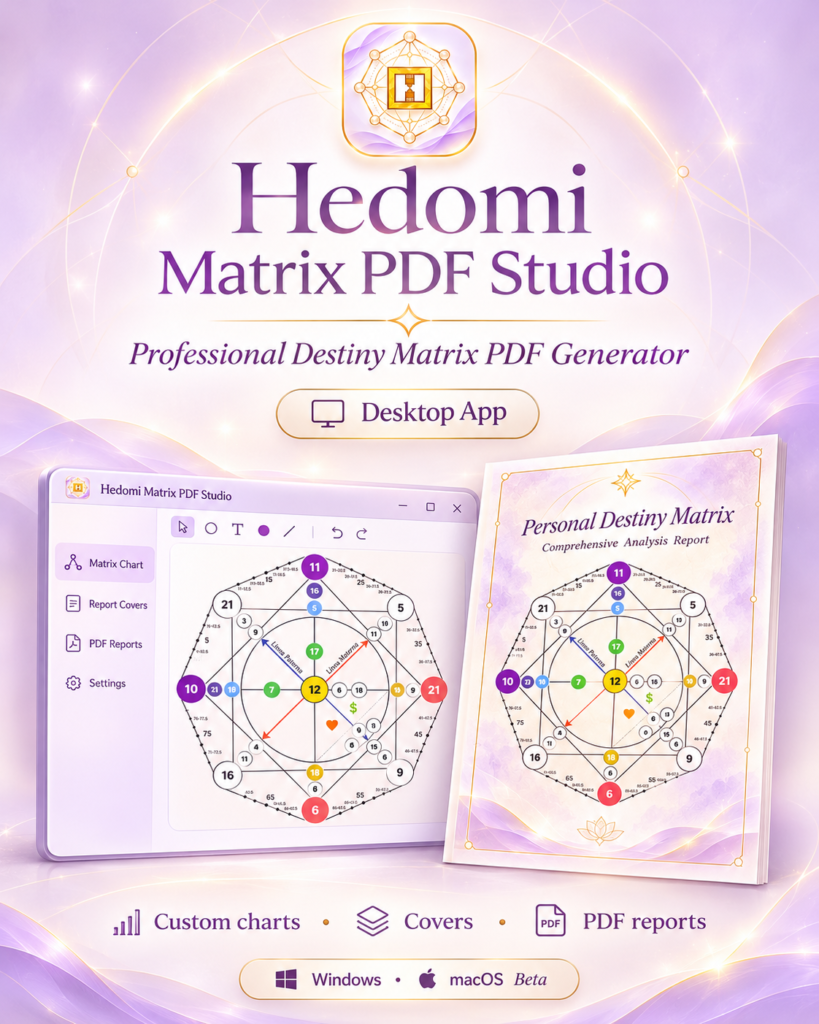
Hedomi Matrix PDF Studio brings content creation, visual chart editing and report design into a dedicated desktop application. Instead of assembling each client reading manually, prepare reusable interpretation libraries and visual settings, then apply them to your next report.
Write and organize interpretations for the 22 energies, matrix positions and categories. Keep content connected to the sections where it belongs.
Choose covers, transparent chart artwork, point colors and coordinates, typography, backgrounds and section spacing.
Preview the complete reading, export a PDF, inspect the pages and share the finished document with your client.
The transparent chart editor is designed for practitioners who want their own branded matrix—not a generic diagram. Load a PNG with transparency, align numbered circles visually and fine-tune precise point coordinates.
Visual adjustments change presentation, not the calculated energy values. Always review the final PDF when using custom artwork.
#8E24AABorder#41314EBuild a consistent visual language across your readings, from the first cover to the final footer.
Add main, final and section covers; use artwork with or without overlaid text. Adapt images for different report languages.
Create reusable report sections, connect relevant energies and interpretations, choose backgrounds and arrange the reading in your preferred order.
Control body text and heading sizes in px or pt. Adjust section and interpretation titles separately and hide either type when needed.
Fine-tune top, bottom, left and right content spacing, giving long interpretations room to breathe.
Add a copyright message and website, choose colors and font, adjust alignment, separator and bottom spacing.
Export your project to JSON and bring it back later, including interpretation content and visual settings. Keep backups in a safe location.
Prepare individual Destiny Matrix analyses and compatibility reports using the available dedicated report modes.
Work with multilingual content using configured AI-assisted tools where available. Translation services may require external credentials and internet access.
Inspect covers, energies, headings and footer before exporting the final document. Review the saved PDF in an independent viewer.
Create interpretations for energies 1–22, attach each text to its position and language, and build sections that reflect your approach to readings. Keep your own methodology instead of being confined to generic interpretations.
Select the report type and enter names and birth dates. Review the calculated energies and positions.
Decide which subjects, energies, interpretations and titles belong in the final report.
Choose covers, chart artwork, point styles, page backgrounds and text settings.
Check chart placement, circle proportions, page breaks, font sizes and footer.
Export the PDF, open it outside the app and confirm each page before delivering.
The official guide covers each tab, with chart, typography, backup and troubleshooting instructions.
Whether you prepare personal consultations, couples reports or detailed educational material, you can adapt the report structure and design to your brand.
The software runs on your computer; it is not a WordPress plugin. WooCommerce is used to purchase the product, not to run the application.
Windows desktop edition, supplied as an installer package. Test a sample export after installation.
Primary releasemacOS support is in testing. The available package is a source/build kit, not a ready-to-install .dmg. Compilation and platform validation are still required.
Testing / build kitPlease read the download details before purchasing. The macOS package requires technical setup; do not expect a signed or notarized Mac app at this stage.
Use the desktop app to create reports with your own text and visual style, and preserve your project in a JSON backup. Design features are flexible, but always verify a PDF before sending it to a client.
Language-aware content
Organize content and cover assets for different languages; proofread AI-assisted wording.
Local editing
Most design work is managed locally; externally integrated translation functions may need internet access.
Control over your data
Backup files can contain client details and embedded artwork; store them securely.
No WordPress required to run
Use the desktop application independently of a website after installation.
Explore the New Matrix screen, Section Editor, interpretation library, cover designer, chart editor, typography, footer, PDF export, backup and troubleshooting.
No. This is a desktop application. You do not need WordPress to prepare and generate reports.
Yes. Upload your own transparent PNG and adjust the point coordinates and colors in the chart editor.
Yes. Set circle fill, border and number colors using hexadecimal values such as #FFBD59.
Yes. The Section Editor offers separate controls for the section title and interpretation/energy title.
Yes. Set numeric sizes in px or pt for body text, section titles, energy titles and cover titles.
The application supports individual and couple report modes where available. Check the relevant mode and preview it before client delivery.
Yes. Add and organize interpretations by energy, position, category and language, then reuse them in report sections.
Local report layout and chart editing are separate from the AI translation panel. AI-assisted functions can depend on external service credentials and internet access.
Use the JSON backup/export and restore functions. Embedded artwork can make the JSON file large. Check the restored project before generating reports.
The macOS edition is currently in testing. The Mac package is a build kit for Intel and Apple Silicon, not a ready-to-install DMG.
The Windows uninstaller offers a data-cleanup option, but the final installer should be tested. Export and store your JSON backup separately before uninstalling.
Open the official documentation for installation, chart editor, PDF output and backup guidance.
Your content, your chart, your design. Explore the product details and choose the correct edition for your computer.
Your Hedomi product
Choose your purchase option and complete your order securely.